
This guide will help you understand how to adjust settings for optimal performance and use the Senhus Connect in your automations.
Accessing the Senhus Control Page
To access the Senhus control page, follow these steps:
1. Go to Settings in your Home Assistant dashboard.
2. Select Devices and Services.
3. Find the integration containing your Senhus Connect controller. Its name may depend on the installed firmware.
4. Select Senhus from the list:
- If you have multiple Senhus devices, you will be presented with a list. Select your desired Senhus device.

Configuration Options
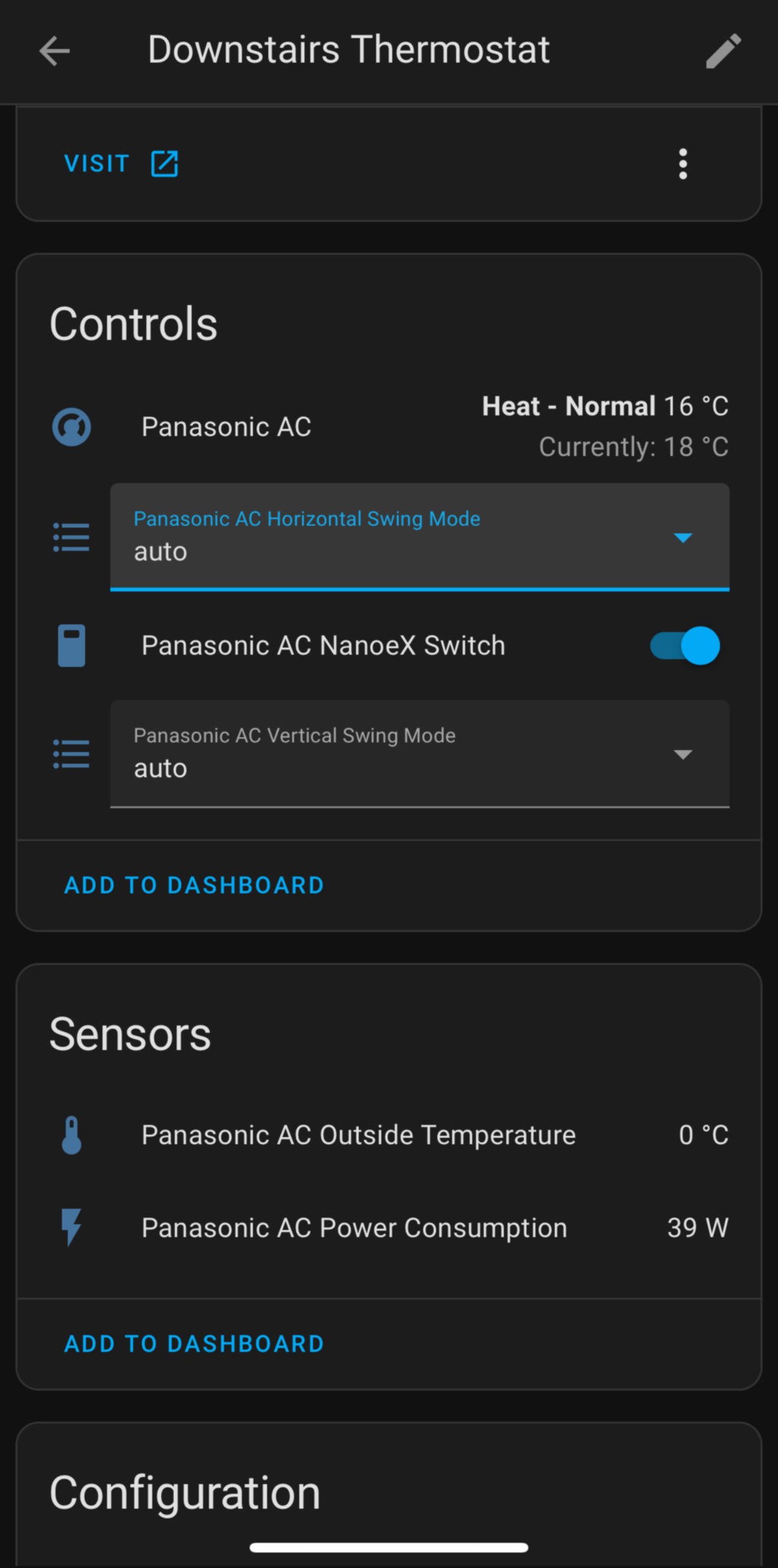
Available modes, readings and controls depend on the connected Panasonic model and installed firmware. Use the entities actually exposed by your controller; the examples below are not a promise that every unit supports every feature.
HVAC Modes
- Modes Available: Cool, Heat, Auto, Dry, Fan
Fan Speeds
- Fan Speed Options: Low, Medium, High, Auto
Swing Directions
- Swing Options: Horizontal, Vertical, Auto
Power Consumption
- Monitoring: The device provides real-time power consumption data.
Special Modes
- Silent Mode: Reduces noise for quiet operation.
- Turbo Mode: Increases performance for rapid heating or cooling.
NanoX Filter
- nanoe X: Where supported by your AC unit and firmware, use the available nanoe X control or status. This is not a filter-replacement indicator.
Understanding Device States
- Active: Indicates that the device is currently operating.
- Idle: Indicates that the device is not currently in use.
By understanding and utilizing these configuration options, you can create sophisticated automations in your Home Assistant setup to enhance the functionality and intelligence of your smart home.
%5D(%2Fdocs-assets%2Fpac-devices.png)%0A%0A%23%23%20Configuration%20Options%0A%0AAvailable%20modes%2C%20readings%20and%20controls%20depend%20on%20the%20connected%20Panasonic%20model%20and%20installed%20firmware.%20Use%20the%20entities%20actually%20exposed%20by%20your%20controller%3B%20the%20examples%20below%20are%20not%20a%20promise%20that%20every%20unit%20supports%20every%20feature.%0A%0A%5B!%5Bpac%20confg%5D(%2Fdocs-assets%2Fpac-confg.png)%5D(%2Fdocs-assets%2Fpac-confg.png)%0A%0A%23%23%20HVAC%20Modes%0A%0A-%20%20%20**Modes%20Available**%3A%20Cool%2C%20Heat%2C%20Auto%2C%20Dry%2C%20Fan%0A%0A%23%23%20Fan%20Speeds%0A%0A-%20%20%20**Fan%20Speed%20Options**%3A%20Low%2C%20Medium%2C%20High%2C%20Auto%0A%0A%23%23%20Swing%20Directions%0A%0A-%20%20%20**Swing%20Options**%3A%20Horizontal%2C%20Vertical%2C%20Auto%0A%0A%23%23%20Power%20Consumption%0A%0A-%20%20%20**Monitoring**%3A%20The%20device%20provides%20real-time%20power%20consumption%20data.%0A%0A%23%23%20Special%20Modes%0A%0A-%20%20%20**Silent%20Mode**%3A%20Reduces%20noise%20for%20quiet%20operation.%0A-%20%20%20**Turbo%20Mode**%3A%20Increases%20performance%20for%20rapid%20heating%20or%20cooling.%0A%0A%23%23%20NanoX%20Filter%0A%0A-%20%20%20**nanoe%20X**%3A%20Where%20supported%20by%20your%20AC%20unit%20and%20firmware%2C%20use%20the%20available%20nanoe%20X%20control%20or%20status.%20This%20is%20not%20a%20filter-replacement%20indicator.%0A%0A%23%23%20Understanding%20Device%20States%0A%0A-%20%20%20**Active**%3A%20Indicates%20that%20the%20device%20is%20currently%20operating.%0A-%20%20%20**Idle**%3A%20Indicates%20that%20the%20device%20is%20not%20currently%20in%20use.%0A%0ABy%20understanding%20and%20utilizing%20these%20configuration%20options%2C%20you%20can%20create%20sophisticated%20automations%20in%20your%20Home%20Assistant%20setup%20to%20enhance%20the%20functionality%20and%20intelligence%20of%20your%20smart%20home.%0A)