
Open the device controls
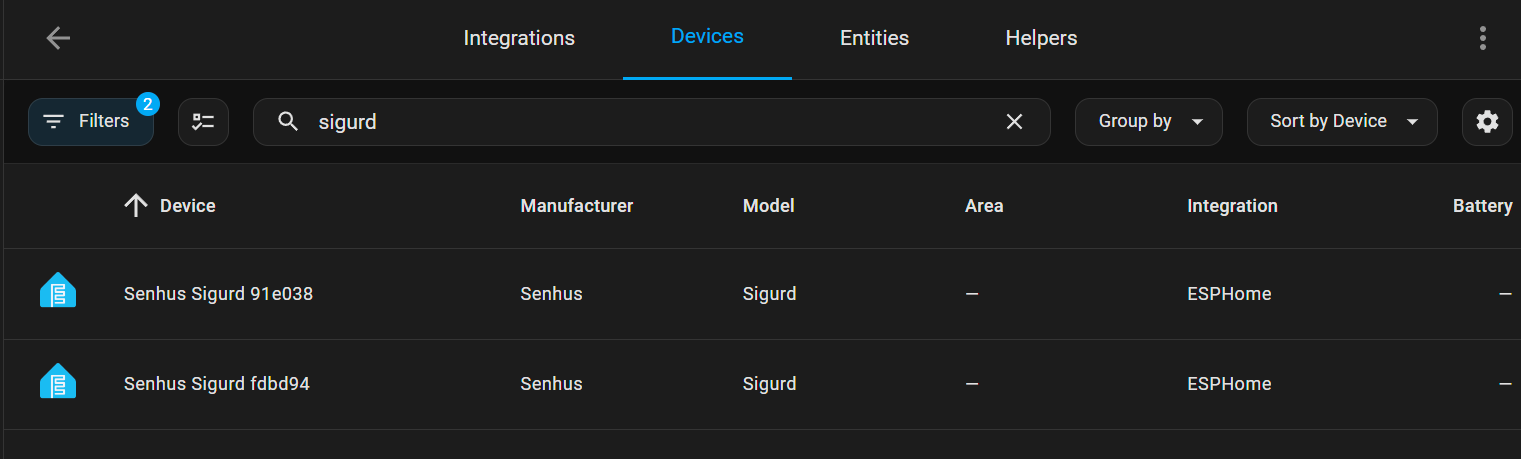
In Home Assistant, open Settings → Devices & services → ESPHome and choose your Senhus SG-1C or SG-1S. Names and available controls can vary with firmware.
Detection distance gates
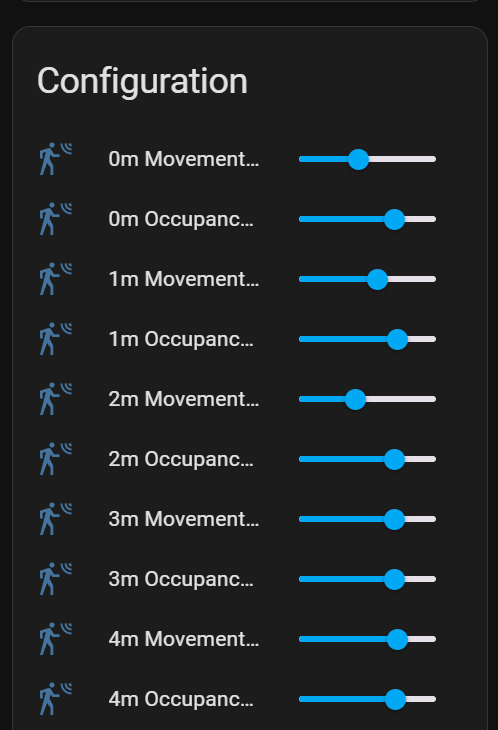
The published firmware exposes separate maximum gates for movement and still presence. A gate is an index in the radar's distance bands; gate 8 does not mean 8 metres. The old firmware labels some controls “0m” through “8m”, but these labels are misleading.
ESPHome documents gates 0–8. Their distance resolution defaults to 0.75 m and can be 0.2 m on supported firmware. Match settings to the installed radar firmware and resolution, rather than assuming one metre per gate.
Limit the maximum gates to the part of the room you need to cover. Check detection at the edge of that area and avoid monitoring through a neighbouring wall.
Sensitivity thresholds
Each gate has a movement threshold and a still-presence threshold. These are signal thresholds on a 0–100 scale, not percentages of certainty. Detection is triggered when the measured signal exceeds the configured threshold. Raising a threshold makes detection less sensitive; lowering it makes detection more sensitive.
The published configuration defines nine gates with two thresholds each: 18 threshold controls. Adjust a few settings at a time and test an empty room, walking occupants, and seated occupants.
Clearance time
Clearance time is the delay before presence clears after the last detection. The published firmware calls it Clearence Time. A longer delay can prevent lights turning off during brief gaps in detection. Start with at least five seconds, then adjust for your room.
Available sensor entities
The published firmware exposes three binary sensors:
- Occupancy or Movement: either moving or still presence detected.
- Movement: moving target detected.
- Occupancy: still target detected.
It also exposes four numeric sensors: Moving Distance, Occupancy Distance, Moving Certainty, and Occupancy Certainty. The two “Certainty” labels refer to radar energy readings, not calibrated probabilities.
Use Occupancy or Movement for typical room-presence automations. Entity names and IDs may differ with your installed firmware.
Practical range
The original guides disagree about detection distance. Gate numbers are settings, not metres, and are not a guaranteed detection range. Test both moving and seated occupants in the intended room before relying on an automation.
%0A%0A%23%23%20Detection%20distance%20gates%0A%0AThe%20published%20firmware%20exposes%20separate%20maximum%20gates%20for%20movement%20and%20still%20presence.%20A%20gate%20is%20an%20index%20in%20the%20radar's%20distance%20bands%3B%20**gate%208%20does%20not%20mean%208%20metres**.%20The%20old%20firmware%20labels%20some%20controls%20%E2%80%9C0m%E2%80%9D%20through%20%E2%80%9C8m%E2%80%9D%2C%20but%20these%20labels%20are%20misleading.%0A%0AESPHome%20documents%20gates%200%E2%80%938.%20Their%20distance%20resolution%20defaults%20to%200.75%20m%20and%20can%20be%200.2%20m%20on%20supported%20firmware.%20Match%20settings%20to%20the%20installed%20radar%20firmware%20and%20resolution%2C%20rather%20than%20assuming%20one%20metre%20per%20gate.%0A%0ALimit%20the%20maximum%20gates%20to%20the%20part%20of%20the%20room%20you%20need%20to%20cover.%20Check%20detection%20at%20the%20edge%20of%20that%20area%20and%20avoid%20monitoring%20through%20a%20neighbouring%20wall.%0A%0A%23%23%20Sensitivity%20thresholds%0A%0AEach%20gate%20has%20a%20movement%20threshold%20and%20a%20still-presence%20threshold.%20These%20are%20signal%20thresholds%20on%20a%200%E2%80%93100%20scale%2C%20**not%20percentages%20of%20certainty**.%20Detection%20is%20triggered%20when%20the%20measured%20signal%20exceeds%20the%20configured%20threshold.%20Raising%20a%20threshold%20makes%20detection%20less%20sensitive%3B%20lowering%20it%20makes%20detection%20more%20sensitive.%0A%0AThe%20published%20configuration%20defines%20nine%20gates%20with%20two%20thresholds%20each%3A%2018%20threshold%20controls.%20Adjust%20a%20few%20settings%20at%20a%20time%20and%20test%20an%20empty%20room%2C%20walking%20occupants%2C%20and%20seated%20occupants.%0A%0A!%5BSensitivity%20controls%5D(%2Fdocs-assets%2Fcontrols1-1.png)%0A%0A%23%23%20Clearance%20time%0A%0AClearance%20time%20is%20the%20delay%20before%20presence%20clears%20after%20the%20last%20detection.%20The%20published%20firmware%20calls%20it%20**Clearence%20Time**.%20A%20longer%20delay%20can%20prevent%20lights%20turning%20off%20during%20brief%20gaps%20in%20detection.%20Start%20with%20at%20least%20five%20seconds%2C%20then%20adjust%20for%20your%20room.%0A%0A%23%23%20Available%20sensor%20entities%0A%0AThe%20published%20firmware%20exposes%20three%20binary%20sensors%3A%0A%0A-%20**Occupancy%20or%20Movement**%3A%20either%20moving%20or%20still%20presence%20detected.%0A-%20**Movement**%3A%20moving%20target%20detected.%0A-%20**Occupancy**%3A%20still%20target%20detected.%0A%0AIt%20also%20exposes%20four%20numeric%20sensors%3A%20**Moving%20Distance**%2C%20**Occupancy%20Distance**%2C%20**Moving%20Certainty**%2C%20and%20**Occupancy%20Certainty**.%20The%20two%20%E2%80%9CCertainty%E2%80%9D%20labels%20refer%20to%20radar%20energy%20readings%2C%20not%20calibrated%20probabilities.%0A%0AUse%20**Occupancy%20or%20Movement**%20for%20typical%20room-presence%20automations.%20Entity%20names%20and%20IDs%20may%20differ%20with%20your%20installed%20firmware.%0A%0A%23%23%20Practical%20range%0A%0AThe%20original%20guides%20disagree%20about%20detection%20distance.%20Gate%20numbers%20are%20settings%2C%20not%20metres%2C%20and%20are%20not%20a%20guaranteed%20detection%20range.%20Test%20both%20moving%20and%20seated%20occupants%20in%20the%20intended%20room%20before%20relying%20on%20an%20automation.%0A%0A%23%23%20Technical%20references%0A%0A-%20%5BSG-1C%20firmware%5D(https%3A%2F%2Fgithub.com%2Fsenhus%2FESP32_Projects%2Fblob%2Fmain%2FSG-1%2Fc3-variant.yaml)%20and%20%5BSG-1S%20firmware%5D(https%3A%2F%2Fgithub.com%2Fsenhus%2FESP32_Projects%2Fblob%2Fmain%2FSG-1%2Fs3-variant.yaml).%0A-%20%5BESPHome%20LD2410%20controls%2C%20thresholds%20and%20distance%20resolution%5D(https%3A%2F%2Fesphome.io%2Fcomponents%2Fsensor%2Fld2410%2F).%0A)