
Open the controls
In Home Assistant, open Settings → Devices & services → ESPHome and select the Aquarea device. You can also enter the controller's IP address in a browser on the same network. Wait for Heat Pump Link before changing a setting.
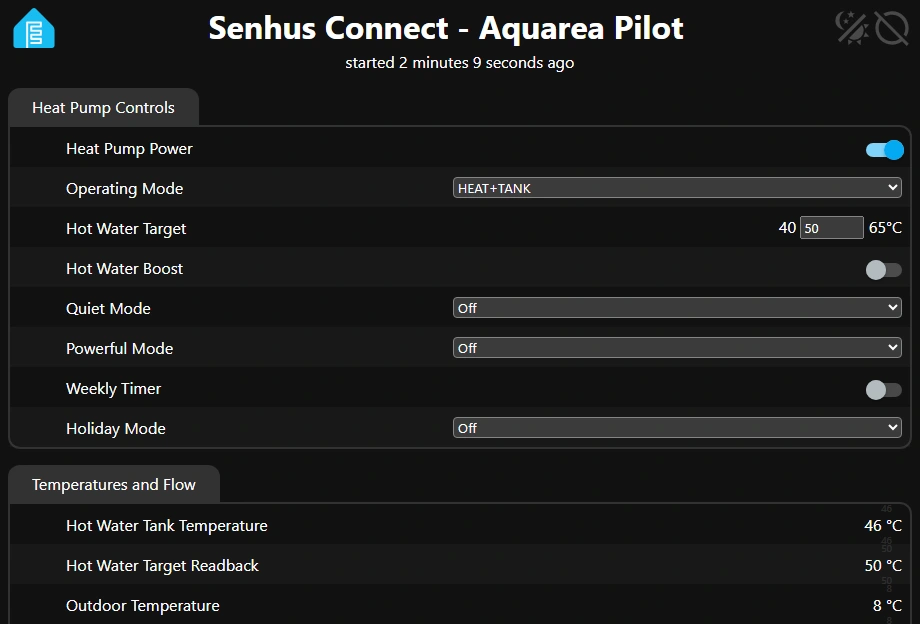
Aquarea browser dashboard with example readings. The tank target is 50 °C and the measured tank temperature is 46 °C.
Everyday settings
| Setting | What it does |
|---|---|
| Heat Pump Power | Turns operation on or off. |
| Operating Mode | Selects heating, cooling, automatic or tank operation, including combined modes where available. |
| Hot Water Target | Sets the tank target from 40 to 65 °C in 1 °C steps, within the limits of your Panasonic controller. |
| Hot Water Boost | Requests an extra hot water cycle. |
| Quiet Mode | Selects Off or Level 1, 2 or 3. |
| Powerful Mode | Selects Off or a 30, 60 or 90 minute timer. |
| Holiday Mode and Weekly Timer | Change the holiday state or enable the existing weekly timer. Use the Panasonic controller to set schedule times. |
After changing the tank target, check Hot Water Target Readback for the setpoint reported by the heat pump. Hot Water Tank Temperature shows the measured temperature.
Zone heating and cooling
Check Heating Water Control Mode or Cooling Water Control Mode before using a zone's Target or Offset field. The setting applies to active zones configured for water-temperature control.
| Reported mode | Accepted range |
|---|---|
| Comp. Curve | −5 to +5 °C as an offset from the heating or cooling curve |
| Direct heating | 20 to 60 °C as a water-temperature target |
| Direct cooling | 5 to 20 °C as a water-temperature target |
Use the range available on your Panasonic controller. Adjust thermostat-controlled zones and installer settings on the Panasonic controller.
